
A multi-marketplace comp is a comparable sale pulled from more than one resale site and lined up against your item, so you price from what buyers actually paid instead of what one platform's sellers hope to get. Done well, it takes three things: a confirmed match on the exact item, sold prices adjusted to the same terms, and a range instead of a single number. PriceXPoint is built around that routine: snap a photo or type a name, and it returns sold, asking and new prices across multiple marketplaces, with links to the sales behind them.
TL;DR
- A comp only counts if it is the same item: same model, size, color, pack count, generation and condition.
- Sold prices show what buyers accepted. Asking prices show your competition. Keep them separate.
- Put every sale on the same footing: item price plus buyer-paid shipping, then subtract fees only when you estimate profit.
- Turn conflicting comps into a range (low, typical, high) and drop outliers you cannot explain.
- Use a tool that shows its sources, so you can verify the match yourself before you list or buy.
Table of Contents
- What "multi-marketplace comps" actually means
- Step 1: Confirm you are comparing the same item
- Step 2: Use sold prices as the anchor
- Step 3: Put every comp on the same footing
- Step 4: Turn conflicting comps into a range
- What makes multi-marketplace research useful
- A worked example: pricing used electronics
- Who benefits most
- Perspective
- Try it on your next item
- FAQ
- Sources
What "multi-marketplace comps" actually means
"Comps" is short for comparables: recent sales of items like yours. Appraisers use the word for houses, and resellers use it for anything from sneakers to graphics cards. The multi-marketplace part means you do not trust one site's data. An item can sell quickly on one platform, slowly on another, and for a different price on a third, because each has its own buyers, fee structure and shipping norms.
Three kinds of data feed a comp:
- Sold listings: completed sales. This is the closest thing to proof of value.
- Asking listings: items currently for sale. Useful for seeing who you compete with, not for proving value.
- New listings: retail or new-in-box prices. They set a ceiling and help you judge how much of retail a used item keeps.
Our own guide on sold price versus asking price goes deeper on why the first is the one to anchor on. The rest of this article is the routine for building a comp you can defend.
Step 1: Confirm you are comparing the same item
Most bad comps fail here, not in the math. Two listings with near-identical titles can be different products. One guide on matching products across marketplaces says to record the model number, manufacturer part number, UPC/EAN/GTIN, SKU and generation from the title, specs, photos and packaging, and to mark each field as confirmed, probable or unclear. An unclear identifier is a reason to investigate, not to assume.

A GTIN is the number under a barcode. In the US it is the 12-digit UPC. According to a product-matching write-up, two listings with the same valid GTIN are the same product with very high confidence, and another source calls barcode matching the gold standard, with 99%+ accuracy for exact matches, though not every listing carries a valid identifier. Used goods, vintage items and collectibles often have no barcode at all, so you fall back on attributes.
The attributes that break a match
Before you accept a comp, check that these line up:
- Exact model and generation (a 2021 model is not a 2023 model)
- Capacity, size and color
- Pack count and bundle contents (a two-pack is not a single)
- Condition and what is included (charger, box, accessories)
- Region, where it matters (carrier-locked versus unlocked, voltage, language edition)
One retail-comparison guide makes the point plainly: if the products do not match, you are comparing different offers, not prices. Another team frames it as a classification: each record is an exact variant, a comparable alternative or an unrelated offer, and you should be able to say which one and with what evidence. That is a good habit for a reseller too. Keep exact matches in your core comp set and treat "close" matches as context only.
Where the app takes the work off your hands
In PriceXPoint you start from a photo or a name, and the app identifies the item. You can then verify and correct that identification, which matters because a wrong match poisons everything downstream. Every price is tied to a listing you can open, so you check the match against the real sale instead of taking a number on faith. Our guide to pricing an item from a photo walks through what to photograph so the match lands first time.
Condition is the other half of identity. If you grade items inconsistently, comps will mislead you, so it helps to use the same vocabulary as buyers. See item condition grades, explained.
Step 2: Use sold prices as the anchor
An asking price is a wish. A sold price is a transaction. Guidance on using sold comps says to exclude active listings when you estimate value, and a second source adds that asking prices describe current competition while matched sales estimate what buyers accepted. Neither tells you the net you keep.
That gives you a clean division of labor:
| Data type | What it tells you | How to use it |
|---|---|---|
| Sold | What buyers actually paid | Anchor your price here |
| Asking | What competing sellers want | Decide how to position against them |
| New | Retail ceiling | Judge how much of retail the item keeps |
A common trap is leaning on asking prices because there are more of them. Plenty of listings sit unsold at inflated prices for months. They tell you that sellers are optimistic, not that buyers agree.
Step 3: Put every comp on the same footing
Two sales at the same headline price are not equal if one included shipping. Another guide to sold listings notes that some prices look lower or higher because shipping was charged separately, so you should compare the total the buyer paid.
The normalizing method is simple: sold item price plus buyer-paid shipping. The sold-comps guide gives an example where $70 plus $15 shipping, $82 with free shipping and $65 plus $20 shipping become $85, $82 and $85. Three sales that looked like $70, $82 and $65 turn out to be tightly clustered once you count what buyers paid.
Two more adjustments follow:
- Condition. If a comp includes an accessory yours lacks, or yours has a flaw theirs does not, adjust from evidence in the listings. The same guide warns that a missing $18 accessory with return risk can justify deducting more than $18.
- Fees and costs. Platform fees, promoted-listing charges, refunds, payment costs and supplies come off separately, and only when you are estimating profit. They do not change what the item is worth to a buyer. Marketplaces charge differently, so see our breakdown to compare marketplace fees, and read how to set and compare shipping-included prices before you decide where to list.
Keep value and profit in separate columns. Value is what the market pays. Profit is what you keep after a particular platform takes its share. Mixing them is how sellers talk themselves into a bad buy.
Step 4: Turn conflicting comps into a range
You will rarely get a clean set. Perhaps you find six sales: $85, $82, $85, $78, $120 and $40. What now?
- Sort by match quality. Drop anything that is not an exact variant or that differs in condition in a way you cannot adjust for.
- Look at the outliers and ask why. The $120 might be a bundle or a sealed unit. The $40 might be sold for parts. One matching write-up says low-confidence matches and extreme price gaps deserve a human look rather than automatic acceptance. If you can explain an outlier, exclude it. If you cannot, note it but do not let it move the middle.
- Take the cluster. Here the four sales from $78 to $85 form the core. That is your typical range.
- Add recency. Newer sales count more, especially for electronics and anything trend-driven, where prices drift quickly.
- State the range in three numbers. A quick-sale price near the low end, a target price in the middle, and a patient price near the top that is still supported by a real sale.
With thin data (only one or two sold comps), widen your range and lean on the asking and new prices for context. A single sale is an anecdote. Two sales on different marketplaces that agree is a signal.
Handling uncertain matches and outliers at scale
If you price hundreds of items, the same logic applies, only faster: flag low-confidence matches, review extreme gaps, and let clean matches through. Writing on AI in eCommerce examples shows how automation is being applied to this kind of repetitive judgment. Our app supports bulk pricing through CSV uploads or multi-item photos, and saves your scan history with export options, so a batch becomes a record you can revisit.
What makes multi-marketplace research useful
Whether you use an app or build it by hand, the research is worth trusting when it does the following:
- Shows the sale behind every number. A price with a link can be checked. A price without one is an opinion.
- Separates sold, asking and new data. Blended averages hide the difference between what buyers paid and what sellers hope for.
- Filters out misleading listings. Our app is designed to filter out unreliable listings so they do not drag your estimate around.
- Names its data sources. You should know which marketplaces fed the result.
- Lets you correct the identification. The human check on the match is the most valuable step in the whole process.
- Works fast enough to use in the moment. At a thrift aisle or a garage sale you have seconds, not an afternoon. See how this plays out in thrift store pricing.
For a wider look at your options, our guides on the best apps to find out what something is worth and the best reselling apps lay out the criteria in more detail.
A worked example: pricing used electronics
Say you want to sell a used console controller. You photograph it, confirm the model number printed on the back, and note the color and whether the original cable is included.

You pull sold comps from several marketplaces and keep only those with the same model and color. You add buyer-paid shipping to each sale, set aside two sales that were listed "for parts," and end up with five clean comps between $44 and $52. The asking listings sit between $55 and $70, but several have been up for weeks, so you treat them as competition, not value. New retail is higher, which tells you the controller keeps a healthy share of its price.
Your range: quick sale at $44, target at $48, patient at $52. Then you subtract the fees of whichever platform you choose to see your profit. The numbers here are illustrative, but the sequence is the real routine. For category specifics, read where to sell used electronics and how to price PC parts with sold price checks.
Who benefits most
- Resellers get a defensible buy limit and list price in seconds.
- Collectors get a valuation tied to real sales rather than a dealer's guess.
- Buyers can tell a fair second-hand price from an inflated one.
- Businesses can track how item values move over time using saved scans and exports.
Perspective
We built PriceXPoint around one belief: a price estimate is only worth something if you can see the evidence under it. Resale pricing goes wrong in two places. The first is identification, where a near-match gets treated as the real thing. The second is mixing up what sellers ask with what buyers pay.
So our approach is to link estimates directly to actual sold listings from several marketplaces, name every data source, and decline to give figures without supporting evidence. We let you verify and correct the item identification, because you often know details a photo cannot show.
The result is a comp you can open, inspect and stand behind, whether you are pricing one item or a whole table of them.
PricexPoint
Try it on your next item
If you price items regularly, the fastest way to build comps is to let the app do the legwork and then check the sales it links. PriceXPoint has a free tier, and paid options when you need more lookups: monthly plans at $4.99 (Basic), $9.99 (Pro) and $24.99 (Power), or one-off token packs of 100 tokens for $5.99, 300 for $12.99 and 1000 for $34.99. See the details on the pricing page.
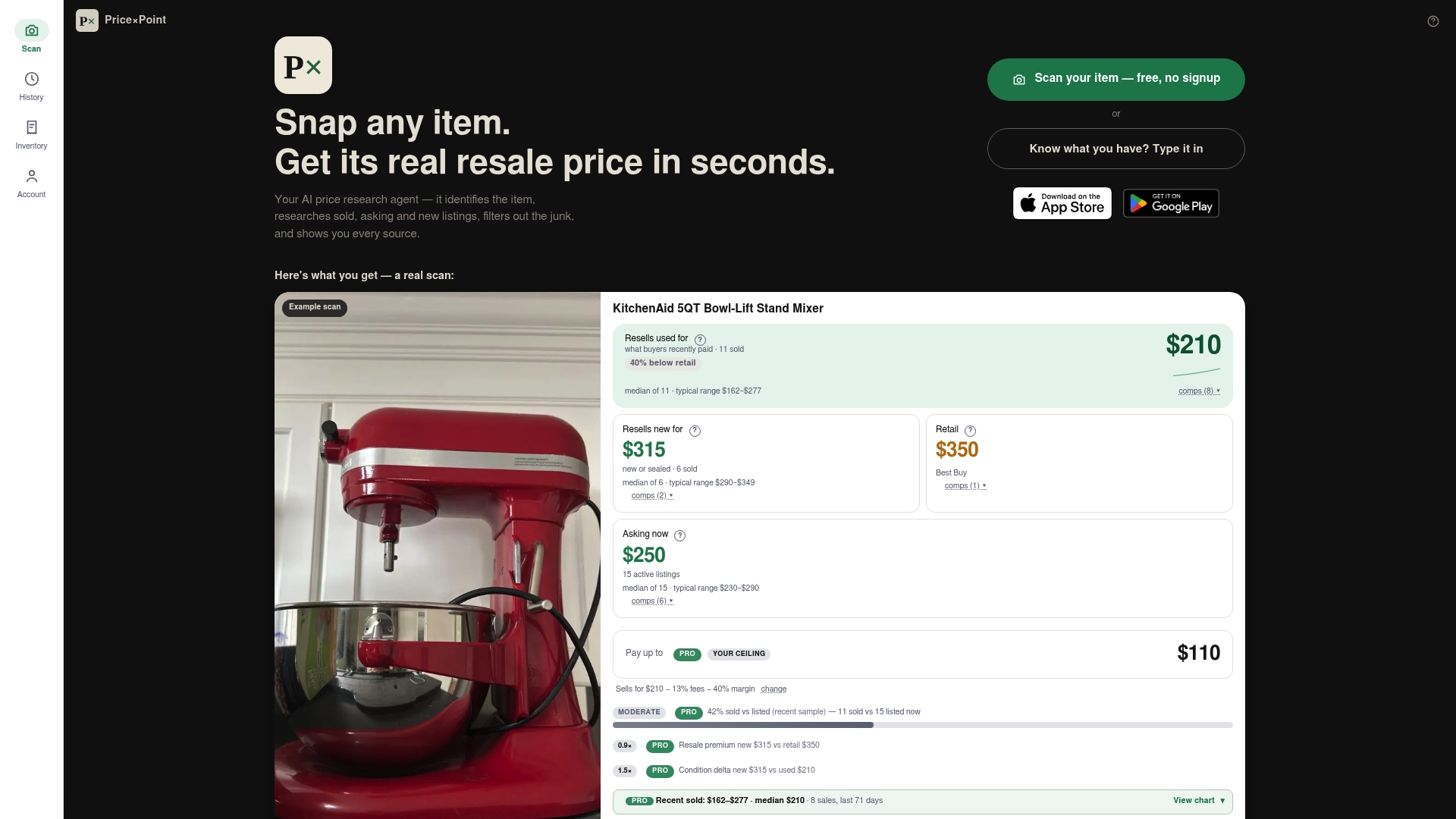
You can also browse real sold prices for used items to see what a finished comp looks like before you scan your own.
FAQ
Are sold comps better than asking prices?
Yes, for estimating value. Sold prices record what a buyer actually paid, while asking prices only show what sellers want. Use asking listings to see your competition and to set your position, not to prove what an item is worth.
How many comps do I need?
Aim for at least three exact matches, ideally from more than one marketplace and from recent weeks. With fewer, widen your range and treat the result as a rough guide. Two matching sales on different platforms are more convincing than five from one.
Should I include shipping in a comp?
Compare the total the buyer paid: the item price plus buyer-paid shipping. Otherwise a free-shipping sale and a separate-shipping sale of the same item look like different prices when they are not.
What if I cannot find a barcode or model number?
Fall back on attributes: brand, name, size, color, generation, condition and what is included. Photos help, and in our app you can correct the identification if the first guess is off. Treat anything you cannot confirm as a lower-confidence comp.
Can I price many items at once?
Yes. PriceXPoint supports bulk pricing via CSV or multi-item photos, and saves your scan history with export options so you can keep a record of each batch.
Sources
- How to Match Products Before Comparing Prices
- How to Match Products Across Stores for Price Comparison
- Product Matching Across Marketplaces: Techniques and Challenges
- Compare Prices Across Amazon, Walmart, eBay, Target
- Marketplace Product Matching: Methods, Schema & QA
- How to Use Sold Comps Without Fooling Yourself
- How to Use eBay Sold Listings to Price Collectibles