Budget builds typically land in the lower hundreds of dollars range, mid-range gaming rigs in the mid-to-upper hundreds or low thousands, and high-end systems generally cost several thousands of dollars, though exact totals swing with memory and storage prices. The single best move before buying anything is to run a build tracker alongside a price-history check, then confirm the delivered price, the amount you actually pay after shipping and tax. A live-price research tool can speed up that verification step.
TL;DR:
- Memory and storage prices are the most unpredictable due to industry shifts toward AI hardware, causing potential cost increases of up to 45% between 2024 and 2026.
- Use price-history tools to verify discounts and avoid overpaying during short-term sales or market swings, especially for volatile categories.
- Prioritize compatibility checks and regional delivered prices over sticker prices to prevent incompatible parts and unexpected shipping or tax costs.
- Lock in graphics cards and memory last, as these components experience the most weekly price fluctuations, minimizing the risk of costly re-pricing.
- Combine multiple price comparison tools, including build trackers, aggregators, and history trackers, to accurately gauge real discounts and compatibility before purchasing.
Table of Contents
- What to Price: The Component Checklist That Determines Your Total
- A Step-by-Step Price-Check Workflow You Can Copy
- Which Tools Actually Help You Compare Prices?
- How Memory and Storage Shortages Are Changing PC Prices
- A Practical Example: Checking Sold and Asking Prices With PriceXPoint
- Why Chasing the Lowest Sticker Price Is the Wrong Instinct
- Speed Up Your Price Checks With PriceXPoint
- FAQ
- Sources
What to Price: The Component Checklist That Determines Your Total
Every build breaks down into the same core parts, and each one has its own cost logic. Skipping a category in your price comparison is how builders end up $150 over budget without knowing why.
- CPU: priced by generation, core count, and socket; older-generation chips drop fast once a new line launches.
- GPU: the single biggest line item in most gaming builds; driven by VRAM capacity, die size, and current demand for AI workloads that compete for the same manufacturing capacity.
- Motherboard: priced by chipset tier and socket compatibility; a board bought for the wrong CPU generation is wasted money.
- Memory (RAM): priced by capacity, speed, and generation (DDR4 versus DDR5); one of the most volatile categories right now.
- Storage (NVMe/SATA): priced by capacity and read/write speed; NVMe drives have followed memory into volatile pricing territory.
- Power supply: priced by wattage and efficiency certification; undersized units cause compatibility headaches later.
- Case: priced by size, airflow design, and included fans; rarely volatile, but easy to overspend on looks.
- Cooling: priced by whether it's stock, air, or liquid; higher-end CPUs often need an upgrade here.
- Operating system: a fixed license cost most builders forget to budget for.
- Peripherals: monitor, keyboard, mouse; often the easiest place to buy used without compatibility risk.
Retailer build guides and catalogs consistently list these same categories as the baseline for pricing a complete gaming desktop rather than individual parts in isolation, because a system's final cost depends on how the pieces fit together, not just what each part costs alone.
Used parts make the most sense for cases, power supplies, and peripherals, where wear has little effect on performance. They make the least sense for GPUs and storage drives, where hidden usage history (mining, heavy workloads) can shorten lifespan. Memory and NVMe storage deserve special attention because both categories have seen outsized price swings tied to manufacturing capacity being diverted toward AI hardware, a dynamic covered in more detail further down.
A Step-by-Step Price-Check Workflow You Can Copy
Pricing a build properly isn't about finding the cheapest single part. It's about running a repeatable process that catches the traps, incompatible parts, hidden shipping costs, fake discounts, before you click buy.
- Define your workload and resolution first. A 1080p esports build and a 4K creator workstation need completely different GPU and memory targets, so set this before pricing anything.
- Pick exact SKUs, not categories. "An RTX GPU" isn't a price point; the specific model, VRAM size, and board partner are.
- Verify compatibility before you price anything else. Check socket and chipset match, memory generation support, GPU physical clearance in your case, and that your power supply has the right connectors.
- Compare delivered offers across retailers. Add shipping and tax to the sticker price; the lowest listed price often isn't the lowest delivered price once a $35 shipping fee shows up at checkout.
- Check price history and completed-sale data. A "40% off" banner means nothing if that's the item's normal price three months running.
- Calculate your full build total, including peripherals, the OS license, and taxes, not just the core components.
- Run final checks on stock, return policy, and warranty length before finalizing, since a part with a 14-day return window carries more risk than one with 90 days.
Pro Tip: Price your GPU and memory last, since those two categories move the most week to week, and locking them in early can mean repricing your whole build before you even order.
Retailer builder tools sometimes bundle combo discounts, a motherboard-and-CPU pair, for instance, that change your total in ways a part-by-part price check won't catch, so it's worth running both a manual comparison and the retailer's own builder before finalizing.
Which Tools Actually Help You Compare Prices?
Different tools solve different problems in the workflow above, and mixing up what each one is for wastes time.
- Build trackers check part compatibility and pull aggregated offers across multiple retailers at once, which is the fastest way to catch a socket mismatch before you pay for it.
- Price-compare aggregators surface delivered offers with regional filters, so you see tax and shipping differences instead of just sticker price.
- Price-history and completed-sale trackers show what an item actually sold for over time, which is the only reliable way to tell a real discount from a marketing banner. PriceXPoint's worth pages illustrate this approach by separating sold, asking, and new listing prices for individual items.
- Retailer builder tools, including those from Newegg and Micro Center, sometimes show combo offers that undercut piecing a build together manually, though they only reflect that one retailer's current stock and pricing.
No single tool covers the whole workflow. A practical approach pairs a build tracker for compatibility, an aggregator for delivered pricing, and a price-history tool to confirm the discount is real, two or three tools used together catch problems that one tool alone would miss.
How Memory and Storage Shortages Are Changing PC Prices
Memory and storage have become the two most unpredictable line items in a PC build, and the volatility traces back to manufacturing capacity being pulled toward AI hardware demand.
According to NextMSC's component-level analysis, a modeled desktop build scenario showed total cost rising roughly 40–45% between 2024 and 2026, with memory and storage accounting for the largest share of that increase. That figure comes from an illustrative industry model, not a universal price guarantee, but it signals where the real exposure sits in your build.
GPUs carry some of this risk too, since high-end cards use the same memory supply chains, but DDR5 kits and NVMe drives have been the most directly exposed because manufacturers have shifted production lines toward enterprise and AI-grade memory instead of consumer parts. The same analysis notes that in 2026, memory and storage pricing became unusually sensitive to that demand shift, which means a quoted kit price today may not hold a week from now.
A few practical tactics reduce the damage:
- Wait for a verified dip. Use price-history data to confirm a drop is a real low point, not a temporary flash sale sitting above the item's typical price.
- Consider used or last-generation parts. A DDR4 kit or previous-generation NVMe drive sidesteps the current volatility entirely if your platform supports it.
- Stagger your purchases. Buy the stable components (case, PSU, cooling) now and wait on memory and storage if prices are trending down.
- Accept a smaller capacity today. Starting with a modest memory capacity and planning for future upgrades often beats overpaying during price spikes.
The giveaway between a short-term dip and a genuine discount is duration: a price that remains stable for several weeks and then drops is more trustworthy than a one-day "sale" that reappears frequently.
A Practical Example: Checking Sold and Asking Prices With PriceXPoint
When we built PriceXPoint, the goal was to give builders a faster way to confirm whether a listed price actually reflects what people are paying, not just what a seller is asking.
Here's how the workflow looks in practice:
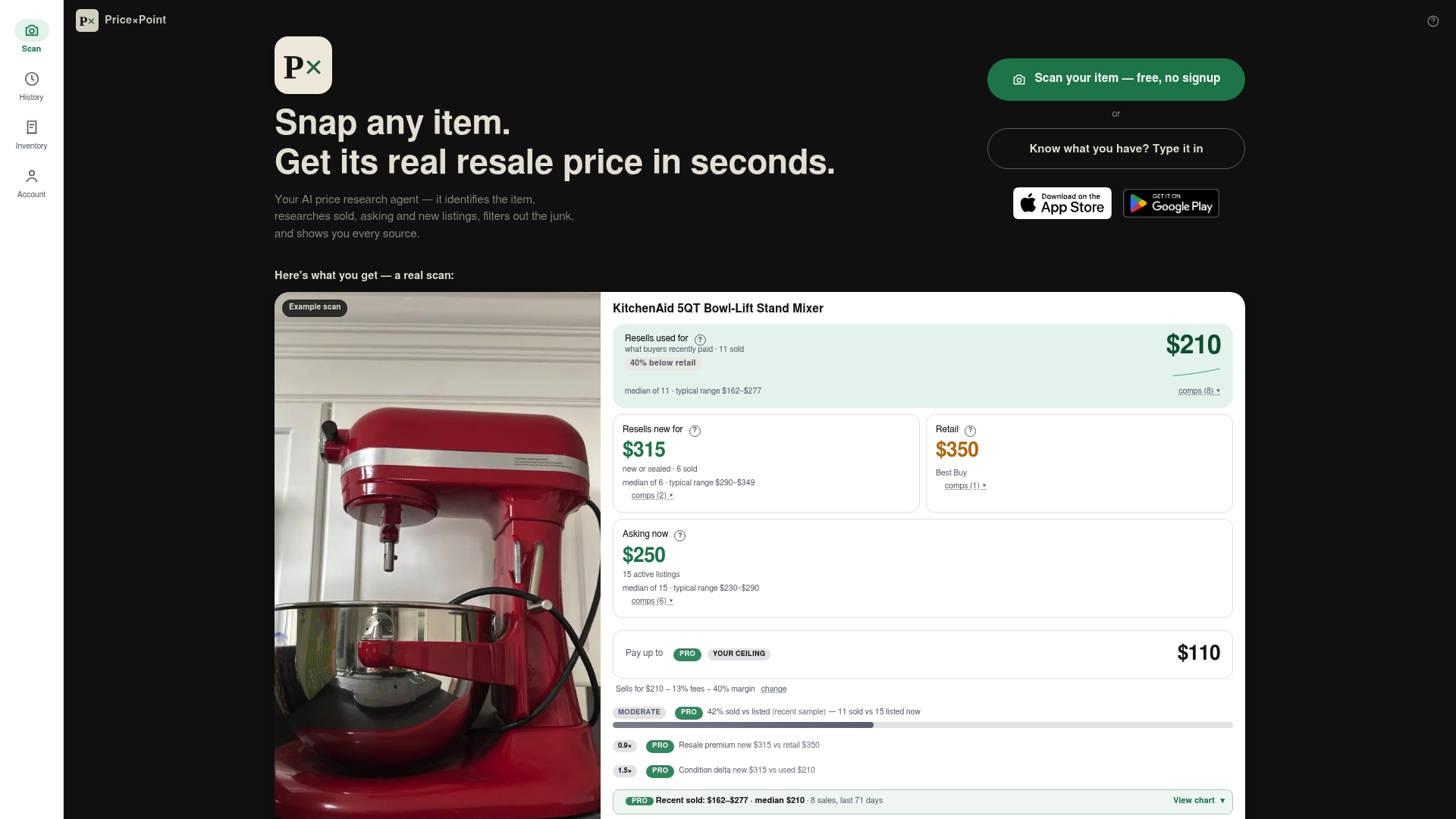
- Snap a photo of a component or type its name, and an app identifies the exact item.
- Return sold, asking, and new listing prices across multiple marketplaces, some with links back to the original listing.
- Figures come with source information so a builder can verify the sale.
- For bulk pricing, support is given for CSV uploads or multiple photos at once, useful when pricing an entire build's worth of used parts in one pass.
Sold-price data matters most when a listing looks too good (or suspiciously high) to be true. If the asking price for a used GPU is $420 but recent sold listings cluster around $340, that gap tells you where real negotiating room sits.
Pro Tip: Always double-check the exact SKU, the listing's timestamp, and whether shipping or local tax is included before treating any price as final, since a sold listing from three months ago in a different region won't match your current delivered cost.
Why Chasing the Lowest Sticker Price Is the Wrong Instinct
The biggest mistake we see in part pricing isn't overpaying for a single component, it's optimizing for the lowest sticker price while ignoring the delivered total and compatibility risk. A $40 cheaper motherboard that needs a $60 BIOS flash kit or lacks the right memory slots isn't actually cheaper.
Price-history data matters more than real-time price-watching in volatile categories like memory and storage. Checking a price once and reacting to it is less useful than watching the trend over two or three weeks, because a single snapshot can't tell you whether you're looking at a dip or a spike.

The other pattern worth resisting is the impulse buy on a part with large market-driven swings. Memory and storage will keep moving as manufacturing capacity shifts toward other demand, and locking in a price the moment you see a discount banner is how builders end up buying at a local peak instead of a real low.
Treat pricing a PC build as a short research project, not a single transaction, and the savings tend to take care of themselves.
— PricexPoint
Speed Up Your Price Checks With PriceXPoint
Once you know which components you're pricing, confirming whether a quoted number is realistic shouldn't take twenty browser tabs. We built PriceXPoint as an AI price research agent: snap a photo or type an item's name, and we return real sold, asking, and new listing prices with links back to the original source, so you can verify a number instead of just trusting it.
For builders pricing several used parts at once, we support bulk lookups through CSV uploads or multiple photos in a single pass. A few ways to put this to work:
- Check our pricing plans, including Basic at $4.99 per month, Pro at $9.99 per month, and Power at $24.99 per month, or buy a one-off token pack starting at $5.99 for 100 tokens.
- Browse our worth pages to see sold-price examples before committing to a plan.
Whichever route you pick, confirm the exact SKU and your regional shipping and tax terms before treating any price as final.
FAQ
How much do all PC parts cost?
Budget builds typically land in the lower hundreds of dollars range, mid-range gaming rigs in the mid-to-upper hundreds or low thousands, and high-end systems generally cost several thousands of dollars, though memory and storage prices can shift these ranges week to week. The most reliable way to get a current figure is to price your exact component list using a build tracker and verify the delivered total.
What is the cheapest site to buy PC parts?
There's no single cheapest retailer across every category. Newegg and Micro Center frequently carry competitive pricing on different components, so comparing delivered offers, item price plus shipping and tax, across multiple retailers for each part is more reliable than assuming one site wins every category.
How are PC parts prices right now?
Memory and storage are the most volatile categories at the moment, driven by manufacturing capacity shifting toward AI-grade hardware demand, according to NextMSC's analysis. Other components like cases and power supplies have stayed comparatively stable, so checking price history before buying memory or NVMe storage matters more than it used to.
Is $700 enough for a gaming PC?
A budget build can support a capable 1080p gaming system if you choose components carefully and watch for deals on memory and storage. Hitting a budget target usually means balancing a mid-tier GPU against a modest CPU, so defining your target resolution and workload first helps you allocate that budget correctly.
How do regional prices affect my PC build budget?
Component prices vary by region due to differing taxes, import costs, and retailer availability, so a price seen in one country's listings won't necessarily match another region's delivered cost. Checking delivered prices, including local shipping and tax, from retailers that serve your specific region gives a more accurate budget than relying on a single global price reference.