
To check what an item actually sold for, use marketplaces' completed or sold-listing filters, compare a cluster of closely matching sales, and include shipping and fees. eBay's Advanced Search with the Completed listings option is the standard starting point. One high sale proves little, but a cluster of close matches priced on the same basis gives you a number you can defend.
TL;DR:
- Search eBay’s Completed listings, then retain sales that match the exact model, condition, included accessories, sale format, and timing before treating them as comparable.
- Use the median or middle range of close sales and set aside outliers, because auction design and bidder numbers can shift otherwise similar results.
- Compare delivered cost by adding shipping and the same inferred platform fee to each sale, since headline prices omit costs buyers ultimately pay.
- Treat ended but unsold listings as clues about price or format, not proof of no value, because reserve prices can affect whether auctions sell.
- Spot check automated results against manual searches before batch pricing, and choose tools that link every sold entry to its source.
Table of Contents
- Where do you find sold prices for resale items?
- How do you pick sales that are truly comparable?
- Why does a single high sale mislead you?
- What is the step-by-step workflow for a defensible price?
- When should you automate sold-price checks?
- What habits actually improve pricing over time?
- Try PriceXPoint to speed up your sold-price checks
- FAQ
- Sources
Where do you find sold prices for resale items?
Start where the transactions happen. On eBay, Advanced Search with Completed listings is the workflow the marketplace itself recommends: enter keywords that describe your item, tick the Completed listings option, and run the search. Sold results show what buyers actually paid, while active listings only show what sellers hope to receive.
A quick routine keeps searches consistent:
- Use the exact brand, model name and model number, not a loose description.
- Add one distinguishing detail such as size, storage capacity or edition.
- Filter to Completed listings, then sort by most recent.
- Open each candidate sale to check photos, condition notes and what was included.
- Repeat on any other marketplace that offers a sold or ended filter in its advanced search.
If you already sell, your own records are a second source. Sellers can view sold items in Seller Hub or My eBay for up to the last two years, and you can search by buyer, order status and time frame. That history shows what you actually received for similar stock, which is often the most relevant evidence you have.
For antiques and older collectibles, our guide to pricing antiques with sold prices shows how the same approach adapts to slower, less standardized categories.
How do you pick sales that are truly comparable?
A sold listing is evidence, not an automatic appraisal. eBay's own guidance points to matching model, variant, size, completeness, condition and selling format before you treat a sale as a comp. Work through these checks for every candidate:
- Match the exact model and variant, and the SKU, part number or serial range when one is available.
- Match condition precisely: new, like new, tested working, for parts, or missing components.
- Compare what was included: charger, box, manuals, lenses, cables or original packaging.
- Match the sale format and timing. An auction that ended in a quiet week is not the same evidence as a fixed-price sale in peak season.
- Record the order number, sale date and a link for every comp you keep.
Pro Tip: Write your matching rules down before you search, so you do not loosen them unconsciously when the first results look disappointing.
Condition is where most mismatches hide. A "used" label can cover a flawless item and one with cracks, and collectors know that small details change value sharply. The piece on conditions that help limited editions hold resale value is a useful outside read if you deal in numbered or limited items. For category examples, see how sold checks apply to PC parts, where one revision letter can change the price.
Why does a single high sale mislead you?
Identical items do not always sell for identical prices. An American Economic Association study of matched eBay listings found substantial price dispersion for otherwise identical products, and showed that auction design and listing mechanics can change outcomes. So a defensible estimate comes from a cluster of comparable sales, with unusual formats and outliers separated rather than averaged blindly.
Keep these habits when you read the results:
- Use the median or the middle range of your comps, not the single highest sale.
- Set aside sales with unusual conditions, such as a bundle, a rare color or a mislabeled listing.
- Remember that mechanics matter: reserve prices and the number of bidders both shape final auction prices.
- Treat ended-but-unsold listings as a diagnostic. Research on second-hand-car auctions found that higher reserve prices made items more likely to go unsold, so an unsold listing may point to overpricing or a poor format rather than zero value.
Recent research on information disclosure, bidder entry and auction revenues finds that shipping charges and bidder participation materially affect final auction prices, so compare the buyer's delivered cost, not only the headline number.
What is the step-by-step workflow for a defensible price?
Turn raw sold listings into a working price with a repeatable routine:
- Collect closely matching completed sales and record headline price, shipping, fees and sale date.
- Add shipping and an inferred platform fee to each headline price, using the same fee model across every comp.
- Flag outliers, such as extreme highs or sales with unusual condition, and summarize with the median or middle range.
- Adjust for condition, missing accessories and timing.
- Set a target listing price that covers fees and your desired profit.
- Save source links and order numbers so you can verify or defend the price later.
Here is how the pieces fit together:
| Step | What you record | Why it matters |
|---|---|---|
| Collect comps | Headline price, shipping, fees, sale date | Builds a like-for-like base |
| Add delivered cost | Price plus shipping plus fees | Shows what buyers truly paid |
| Remove outliers | Median or middle range | Stops one odd sale skewing the result |
| Adjust and price | Condition, accessories, timing, margin | Produces a listing price you can defend |
| Archive evidence | Links and order numbers | Lets you answer questions later |
The whole routine is manageable for one item, which is exactly why it becomes painful across a full table of stock.
When should you automate sold-price checks?
Manual searches are the most precise way to check one item, but they are slow when you are pricing dozens. Bulk workflows change that: uploading a CSV or scanning several items from one photo lets you price a whole category in a single pass instead of searching item by item.
When you evaluate any tool, look for these features:
- Identification from a photo or a name, so you do not misread a model number.
- A source link for every sold entry, so you can verify the data yourself.
- Separate views of sold, asking and new prices, so asking prices never pass as sales.
- Exportable scan history, so your records stay organized.
Pro Tip: Spot-check a few automated results against a manual Completed listings search before you trust any tool across a whole batch.
Our overview of AI for resellers that shows sold listings explains how this kind of aggregation works in practice.

What habits actually improve pricing over time?
Our editorial view is that accuracy comes less from clever tools than from discipline. Keep a pricing log and save the search snapshot you used to set each price, so a surprising sale later teaches you something instead of just stinging. Match your strictness to the stakes: use narrow, near-identical comps for high-value items and a looser cluster for low-value ones, where the search time costs more than the margin. And always verify delivered cost and keep evidence links, because buyers ask questions and disputes are far easier when you can point to the sales behind your price.
— PricexPoint
Try PriceXPoint to speed up your sold-price checks
We offer PriceXPoint to run this workflow for you. Snap a photo or type an item name, and we aggregate sold, asking and new listings with links back to the sources. You can price in bulk by CSV and keep your scan history for verification. See what a result looks like on our sample worth page, then pick a plan on our pricing page: Basic is $4.99 per month, Pro is $9.99 per month and Power is $24.99 per month.
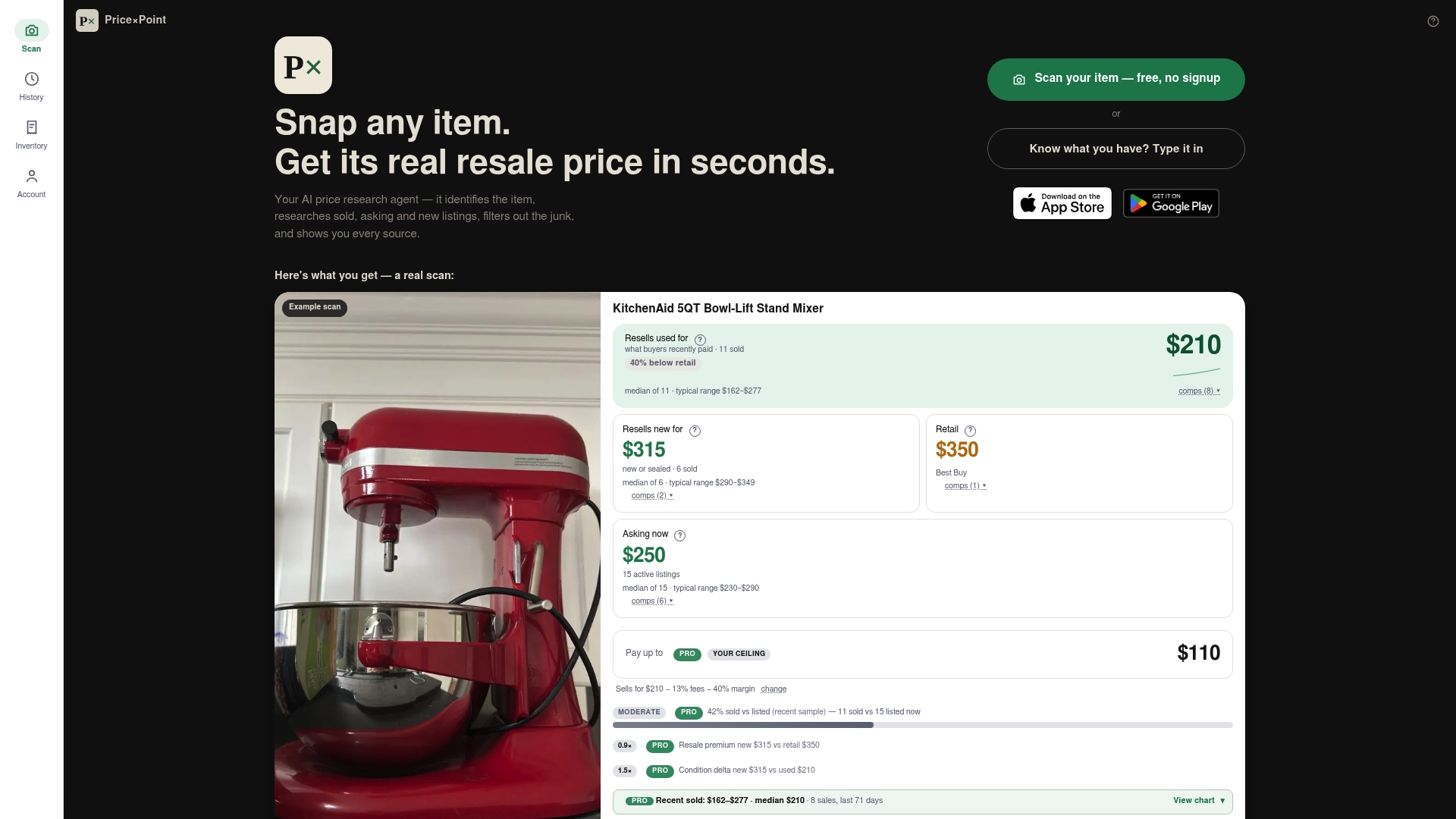
Start with a few items from your own shelf and compare our sold results against your manual searches.
FAQ
Where can I see what an item really sold for?
Use a marketplace's sold or completed listings filter. On eBay, open Advanced Search, enter descriptive keywords, choose Completed listings and search. Sold results show completed transactions rather than asking prices.
How many sold listings should I compare?
Compare a cluster of closely matching sales rather than a single result. A group of closely matching comps with the same condition, format and inclusions gives you a median you can defend and makes outliers easy to spot.
Do shipping and fees change the sold price?
Yes. Compare the buyer's delivered cost, not just the headline price, because shipping charges and bidder participation affect final auction prices. Apply the same fee assumptions to every comp so the numbers stay comparable.
Can I check my own past sales?
Yes. Sellers can open Seller Hub or My eBay and review sold items from up to the last two years. You can search by buyer, order status and time frame to confirm past sale details.
Should I use unsold listings when pricing?
Use them as a diagnostic only. An ended-but-unsold listing suggests the price or format did not work under those conditions, but it does not prove the item has no value.
Sources
- Aeaweb
- Information Disclosure, Bidder Entry, and Auction Revenues: Evidence from eBay | Eastern Economic Journal | Springer Nature Link
- Finding your sold items | eBay