A graphics card is worth what a buyer actually paid for the same model recently, adjusted for its condition and what comes in the box. It is not what you paid, not the MSRP, and not the number on the most optimistic listing. This guide shows how to find that number for your own card, what pushes it up or down, and when to sell.
TL;DR
- Resale value comes from completed sales of the exact model, not from asking prices or original retail price.
- Condition, box and accessories, proof of purchase and transferable warranty each move the price within a model's range.
- Age sets the slope, but launches, shortages and VRAM demand can bend it. Selling before a new generation is usually easier than after.
- Gather 5 to 10 recent sold comps, throw out the outliers, and price inside the middle of what remains.
- A tool that links each estimate to real sold listings saves the manual legwork, especially for several cards.
Table of Contents
- What GPU resale value really means
- How much do used graphics cards sell for?
- A step-by-step method to price your card
- What moves a graphics card's price
- How age, new releases and demand change the value
- When to sell a used graphics card
- Where to sell, and what changes the net
- Buying used: is the price fair?
- Pricing a whole pile of cards
- Promo
- Our perspective
- FAQ
- Sources
What GPU resale value really means
Resale value is the price a used card clears at on the open market within a reasonable time. Two numbers get confused with it all the time.
Asking price is what sellers hope to get. Anyone can list a card at any amount, so a page full of listings tells you about seller optimism, not buyer behavior. As LaptopJudge points out, a seller can ask anything while completed sales show what buyers paid.
Sold price is the number that matters. It is the amount a real buyer handed over, which makes it the only honest anchor for either side of the deal.
There is also a third number to ignore: the original retail price. The same source advises against using MSRP as a resale formula, because the used market responds to supply, demand and the next generation of cards, not to what the first owner spent.
How much do used graphics cards sell for?
There is no single answer, and any article that gives you one table of "typical" prices will be stale within weeks. GPU prices move with new launches, supply, and what people want to run on them. What stays stable is the structure of the answer:
- Model matters most. An RTX 3080 and an RTX 3080 Ti are different products with different sold ranges. The same goes for 8 GB and 12 GB variants of one model name.
- Tier shapes the spread. High-end cards have wide ranges because condition and buyer type vary a lot. Mid-range cards with many sales cluster tightly, so a good comp set is easy to build.
- Market matters. Local pickup, auction sites, fixed-price marketplaces and enthusiast forums settle at different levels, and shipping, fees and tax change what you keep.
So instead of memorizing prices, learn to read the market for your exact card. That takes about ten minutes.
A step-by-step method to price your card
1. Identify the exact model
Read the label on the card or the box, or check the model in your system's GPU utility. Note the full name, the memory size, and the board partner (for example, a specific brand's overclocked edition). Partner versions can sell differently from reference designs, and a wrong identification throws off every comp after it.
2. Pull completed sales, not live listings
Search the marketplaces you are likely to sell on and filter to sold or completed items. Write down at least five to ten sales from the last few weeks. Record the sale price, condition, whether a box was included, and shipping.
A useful reference also states the currency, tax treatment and date of observation, and keeps asking prices separate from completed sales. Without those labels, a number is hard to interpret.
3. Match condition honestly
Sort the comps into groups: tested and working with box, working without box, and for parts or untested. Only compare your card with its own group. Mixing a untested "as is" sale with a boxed card in perfect shape drags your average in the wrong direction.
4. Remove the outliers
Drop the highest and lowest sale. A bidding war on one auction or a desperate quick sale on another tells you about two people, not the market.
5. Set your price from the middle
Price at or slightly above the middle of your clean group if you can wait, and at the lower end if you want a fast sale. Leave room for a small offer if the platform allows haggling.
A worked example
Say you hold a mid-range card and find eight sold comps. Two are untested or for parts and one is an obvious outlier. That leaves five boxed, working sales. Take their middle value as your anchor. If yours has no box, shade down slightly. If you have the receipt and a warranty that transfers, you can hold closer to the top of the cluster. The numbers are yours to fill in, but the process is identical for every card.
If you want the same method for other categories, our guide on how to calculate resale value of almost anything walks through it.
What moves a graphics card's price
Condition
Condition covers more than whether the card boots. LaptopJudge advises checking for visible damage, missing parts, unusual fan noise, crashes, and image defects such as colored specks or lines (artifacts). Run a stress test or a benchmark loop before listing, and check temperatures. A card that crashes under load belongs in the for-parts bucket, and pretending otherwise leads to returns and disputes.
Mining and repair history
If you know the card was repaired or used for cryptocurrency mining, say so. The same source recommends sharing that with a buyer. Disclosure protects you from a dispute, and many buyers accept a lower price in return for honesty more readily than a surprise after delivery.
Box, accessories and proof of purchase
The original box, the support bracket, power adapters and cables, and the receipt all help. They signal a careful owner and make the card easier to resell again, and buyers pay for that reassurance.
Warranty
Some manufacturers allow warranty coverage to continue for a second owner and others do not, and terms differ by brand and region. Confirm the status with the manufacturer before you promise anything in a listing. A confirmed, transferable warranty is a real selling point. An unconfirmed one is just a claim.
Exact variant
Memory size, cooler design, and factory overclock all separate listings under the same model name. Always compare variant to variant.
How age, new releases and demand change the value
GPUs depreciate, but not in a straight line. TechSpot's 2020 analysis used a rule of thumb of roughly 15% of MSRP lost per year for used cards. Treat that as a rough baseline from a particular period, not a law. The same analysis describes how prices shift around new releases, supply constraints, performance per dollar, and demand for high-VRAM cards from people doing productivity work.
In practice, four forces shape the curve:
- Generation launches. When a new series is announced, owners of the old one list at the same time, and supply of that card rises.
- Supply shocks. Shortages can push used prices close to or above what the card sold for new. Gluts do the opposite.
- Performance per dollar. A used card competes with whatever new card sits at the same price. If a new mid-range card matches it at similar money with a warranty, the used price has to give.
- VRAM demand. Cards with a lot of memory can hold value better when buyers want them for rendering, video editing or local AI work.
Because these forces change month to month, re-check sold comps every time you plan to list, even if you looked a few months ago.
When to sell a used graphics card
The general pattern is simple: the earlier in a card's life and the earlier before a new generation arrives, the better. Early in the lifecycle a card keeps most of its value, and the biggest risk to your price is a new generation that gives buyers a cheaper alternative.
That suggests a practical rhythm:
- Before the announcement. Enthusiast forums commonly advise selling a few weeks before a new generation is announced, when listings of your model are still scarce. That is community opinion rather than a guarantee, but the logic holds.
- Right after launch, when new cards sell out. If new stock is hard to find, buyers turn to used cards and prices can firm up.
- Not in the middle of the flood. The weeks after a launch, when many upgraders list at once, usually mean more competition for you.
- Do not sell before you have a replacement. If you depend on the machine, make sure the new card is in and working first.
The launch calendar changes, so check current news for your category rather than relying on last year's timing.
Where to sell, and what changes the net
Marketplaces differ in fees, buyer protection and speed. Auction sites reveal the market price fast and give you a clean set of sold comps. Fixed-price listings let you wait for a better offer. Local pickup avoids shipping and fees but narrows your buyer pool. Instant-quote buyback services give speed and certainty, usually at a lower price than selling to another person directly.
Whatever route you choose, compute your net: sale price minus fees, shipping and packing, and any payment processing. A slightly lower gross on a platform with lower fees can leave you with the same amount in your pocket.
Ship a graphics card in a rigid box with the card in an anti-static bag, the fans immobilized, and the PCIe bracket protected. Photograph it before it goes out. Take clear photos of the ports, the backplate and the serial number when you list it.

Buying used: is the price fair?
The same method works from the buyer's side. To decide if a used GPU is fairly priced, compare it with several recent completed sales of the exact variant, then adjust for condition, accessories, proof of purchase and any warranty that can actually be confirmed. A listing far under the cluster deserves questions, and one far above it deserves a pass.
Before you pay, ask for photos of the card running, a benchmark screenshot, and the serial number. Use a platform with buyer protection for anything shipped.
Pricing a whole pile of cards
If you are clearing a stack of hardware, doing ten comps by hand for each card is slow. That is where a research tool earns its keep.
Promo
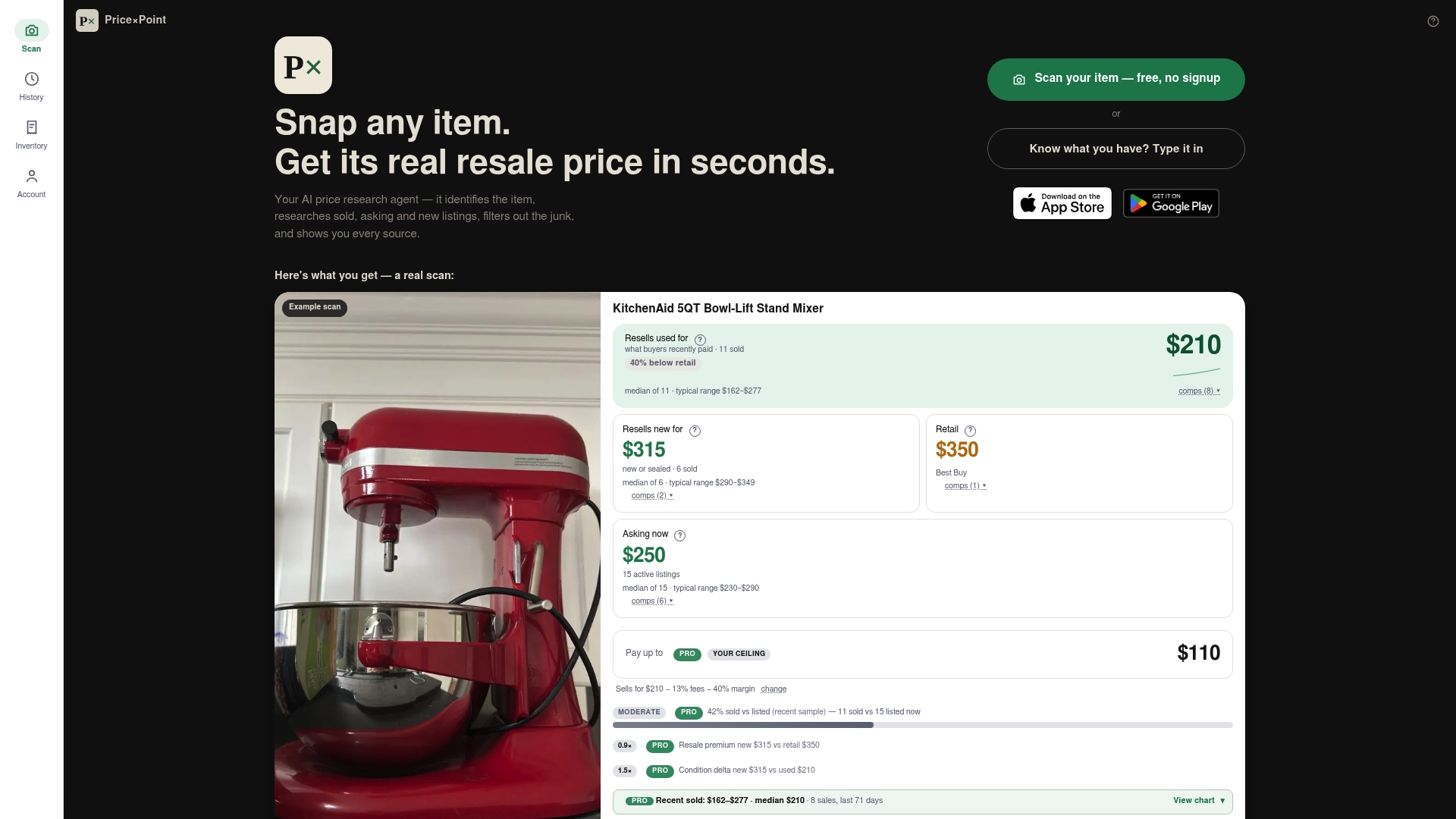
PriceXPoint is built for exactly this job. Snap a photo of your card or type its name, and the app researches sold, asking and new listings across multiple marketplaces, filters out unreliable listings, and links the estimate to the actual sales behind it. You can price in bulk with a CSV or a multi-item photo, then save and export your scan history.
There is a free tier to start. Paid monthly plans are Basic at $4.99 per month, Pro at $9.99 per month and Power at $24.99 per month. If you would rather not subscribe, token packs are a one-off $5.99 for 100 tokens, $12.99 for 300 tokens or $34.99 for 1000 tokens. See the details on the PriceXPoint pricing page.
You can also browse real sold prices for used items to see what the format looks like, or read how the same approach applies to console resale pricing and trading cards with linked sold comps.
Our perspective
Most bad GPU prices come from the same mistake: someone prices from asking listings. Those numbers are cheap to produce and easy to inflate, so the market looks richer than it is.
We built PriceXPoint around the opposite habit. Our estimates are designed to link to actual sold listings from several marketplaces, and we name every data source so you can see where a figure comes from. If we cannot back a figure with evidence, we do not publish it.
Identification is the other half. A card mislabeled by one memory tier can shift the result badly, so you can check and correct what the app identified before you rely on the number. For sellers that means pricing with confidence. For buyers it means knowing whether a listing is fair before sending money.
Our advice is the same whether you use our app or a spreadsheet: start from sold comps, match the condition, and keep a record of the evidence behind your price.
PricexPoint
FAQ
How much is my used graphics card worth?
It is worth the middle of recent completed sales for the exact model and variant, in the same condition as yours. Pull five to ten sold comps, remove the outliers, and price from what remains. Asking prices and original retail price are poor guides.
Do graphics cards hold their value?
They lose value over time, and TechSpot's 2020 rule of thumb put the decline near 15% of MSRP per year. Launches, shortages and demand for high-memory cards can speed that up or slow it down, so check current sold prices instead of relying on a rule.
Does having the box and receipt raise the price?
It usually helps. The box, accessories and proof of purchase make a card easier to trust and to resell. If the manufacturer confirms that the warranty transfers to a second owner, mention it in your listing.
Should I mention if my card was used for mining?
Yes. Share any mining or repair history with the buyer. Clear disclosure reduces disputes and returns, and many buyers will still pay a fair price for a card that tests well.
When is the best time to sell a used GPU?
Before a new generation is announced is generally easier than the weeks after launch, when many owners list at once. Early in a card's life it also keeps more value. Check current launch news for the timing in your category.
Sources
- What Is GPU Resale Value And Warranty Transfer? (LaptopJudge)
- What's Your Old Graphics Card Now Worth? (TechSpot)