
Local pickup usually carries no Meta selling fee, while shipped sales through Facebook Checkout come with a processing fee, so the smartest move is to price using sold-listing baselines plus a small negotiation buffer. Check comparable sold items first, then set your number, then watch and adjust after a short window. That single habit does more for your bottom line than any pricing trick.
TL;DR:
- Local pickup sales typically avoid Meta's selling fee, while shipped sales through Facebook Checkout are charged a 10% fee on the full transaction, including shipping and taxes.
- Pricing should be based on recent sold listings with adjustments for condition, accessories, and delivery method, rather than relying on asking prices or gut feeling.
- Using a negotiation buffer of a few dollars or percentage helps secure a sale while leaving room for price concessions, especially with priced-stale items.
- Listing with buyer-pay shipping and upfront costs increases transparency and attracts more buyers compared to bundling shipping into the item price.
- Automated tools like PriceXPoint can significantly speed up accurate pricing research by pulling verified sold prices across multiple markets.
Table of Contents
- What fees does Facebook Marketplace actually charge?
- A step-by-step pricing strategy that actually works
- How to find and read sold listings correctly
- Worked pricing examples and quick heuristics
- How PriceXPoint speeds up accurate pricing research
- Recap and your next three moves
- What sellers get wrong about Marketplace pricing
- Price with confidence using PriceXPoint
- Sources
- FAQ
What fees does Facebook Marketplace actually charge?
Whether you owe Meta anything comes down to how the buyer pays. Local pickup deals, where cash or a direct payment changes hands in person, typically avoid platform fees entirely. Sales completed through Facebook Checkout, the built-in shipping and payment system, are a different story: Meta takes a cut calculated on the full transaction, not just the item price.
According to Meta's Payments terms, the selling fee is calculated on the entire transaction amount, meaning the sale price plus shipping charges plus any applicable taxes, not the item price alone. That minimum matters most on cheap items: a $5 sale with a flat minimum fee can lose a much bigger share of the proceeds than a $200 sale would.
Meta's Payments terms confirm the US Marketplace checkout fee runs at 10% with a minimum charge, which changes the math on low-price, shipped items more than on higher-ticket ones.
A few mechanics are worth knowing before you list anything for shipped sale:
- The fee is deducted automatically by the payment provider from your payout, and it is generally nonrefundable even if a buyer later returns the item.
- Sellers stay responsible for any taxes owed on the sale and for payment-provider charges layered on top of Meta's own fee.
- Rates and minimums differ by country, so a seller in one market cannot assume the same numbers apply somewhere else.
- Local pickup sidesteps the fee structure altogether, which is why many sellers of bulky or low-margin items stick to cash-in-hand deals.
Here is what that looks like in practice. Say you sell a used lamp for $40 with local pickup: you keep the full $40, no Meta fee involved. Now say you sell the same lamp for $40 through Checkout with $8 shipping. That gap is exactly why so many casual sellers default to pickup for anything that is not worth shipping.
One more wrinkle: listing with buyer-pay shipping, where you state a clear shipping cost separately rather than folding it into the item price, tends to attract more buyers while protecting your margin, since the fee calculation still applies to the total either way. The transparency itself is the advantage: buyers do not feel like they are being nickel-and-dimed when the shipping number is upfront rather than buried.
A step-by-step pricing strategy that actually works
Pricing on Marketplace is not guesswork if you treat it like a small research project. The process below takes maybe ten minutes per item and consistently beats pricing off memory or gut feeling.
- Research comparable sold listings for the exact model, size, or style, using Marketplace's sold-item view rather than trusting what other sellers are currently asking.
- Build a baseline price from those sold comps, weighting the most recent and closest-condition matches more heavily than older or rougher ones.
- Adjust for condition, subtracting for scratches, missing parts, or wear, and adding for original packaging, extra accessories, or documented low use.
- Add a negotiation buffer, typically a modest markup above your target so you have room to accept a lower offer without losing money.
- Decide your shipping approach, choosing local pickup to skip fees entirely or buyer-pay shipping with a clearly stated cost if you need wider reach.
- List and monitor, tracking views, messages, and offers over the first several days to gauge whether your price matches demand.
- Adjust or relist if activity stalls, either lowering the price to reignite interest or refreshing the listing so it resurfaces in search.
The negotiation buffer deserves more attention than most sellers give it. Reselling experts commonly suggest pricing slightly above your true target so you can accept a modest offer and still land where you wanted, rather than listing at your floor price and having nowhere to go when someone asks for a discount. A buffer of a few dollars on cheap items or a modest percentage on pricier ones usually works without scaring off serious buyers.
Psychological pricing plays a role too. Odd numbers like $47 instead of $50 can read as more carefully considered than a round figure, which sometimes signals a firmer price to buyers who like to haggle. The flip side is the markdown effect: editing a stagnant listing's price down after a week creates a visible price drop that can prompt buyers who were on the fence to act, since Marketplace surfaces recent price changes to people who had previously viewed or saved the item.
Pro Tip: Price slightly above your walk-away number, then let a small, quick discount close the deal instead of listing at your floor and losing all your room to negotiate.
Shipping deserves its own decision point, separate from the base price. If you fold shipping into the item price and call it "free shipping," the fee still applies to the full transaction, and buyers cannot easily tell what they are actually paying for the item versus the delivery. Stating shipping separately, even a flat estimated rate, tends to build more trust and lets buyers compare your listing against others more fairly.
How to find and read sold listings correctly
Sold listings are the closest thing Marketplace offers to real market data, but only if you know how to pull them and what to trust once you have them. According to a guide to viewing sold items, sellers can access a dedicated sold-listing view and apply filters for price range, condition, and delivery option to narrow results down to genuinely comparable sales.
Here is what to record for each comparable listing you find:
- The final sold price, not the original asking price, since sellers frequently list high and negotiate down.
- The item's stated condition, whether new, like new, good, or used, since condition swings price more than almost any other factor.
- Whether the sale involved shipping or local pickup, since shipped totals include costs that pickup prices do not.
- How old the listing is, since a sale from six months ago may not reflect current demand or seasonal pricing.
Not every signal on a sold listing carries equal weight. The actual sold price is the number that matters most, along with clear photos showing true condition and any seller notes about defects or included accessories. Discount anything that looks like a stale asking price still sitting unsold, and be skeptical of offers that never actually closed, since Marketplace sometimes shows listings that were removed rather than sold.
Combining several sources builds a sturdier baseline than relying on one or two comps. Practical experience among frequent sellers suggests that pulling around five recent sold comparables, rather than eyeballing one or two, tends to produce listings that sell faster and closer to true market value. Geography and season matter too: a snow blower sells for more in October than in June, and prices in a major metro area often run higher than in a rural market with fewer buyers competing for the same item. When a comparable listing differs from yours in shipping option, region, or included extras, normalize it: strip out the shipping cost, adjust for regional demand, or subtract the estimated value of bundled accessories before treating it as a true match.
Worked pricing examples and quick heuristics
Numbers make the method concrete. Here are three worked examples using the fee logic and sold-comp approach above.
- Electronics, a used smartphone. Sold comps for the same model in similar condition cluster around $220. Subtract an estimated shipped-sale fee near 10% if you plan to ship it, which works out to roughly $22 on a $220 total, leaving about $198 in net proceeds before adding your buffer. List around $235 to $245 with a small negotiation cushion built in, or skip the fee entirely with local pickup at closer to $220.
- Furniture, a used sofa. Bulky items rarely ship through Marketplace checkout, so most sofa sales happen via local pickup with no Meta fee at all. If sold comps for a similar sofa in good condition average $150, price around $170 to $180 to leave room for the inevitable "would you take $150" message.
- Branded shoes, a pair of sneakers. Sold comps for a specific model and size average $90 for lightly worn pairs. Shipping is common here, so factor in the fee: roughly $9 on a $90 sale, plus shipping cost added to the buyer's total. List near $100 to $105 to cover the fee and buffer while staying competitive against other sold comps in that size.
Reselling guidance commonly warns against pricing purely off original retail value, since used-item buyers expect a real discount from retail regardless of how well an item was cared for.
A few quick heuristics worth keeping in your back pocket: bundle slow-moving accessories with a related item rather than listing them separately at prices too low to attract attention on their own. Lower the price before you consider relisting, since a price cut on an existing listing preserves your view count and message history, while relisting starts you from zero. Give a new listing several days of real visibility before assuming the price is wrong, since Marketplace search and recommendation algorithms take time to surface an item to the right buyers.

How PriceXPoint speeds up accurate pricing research
Manually pulling five or more sold comps per item works, but it takes time, and time is the one thing bulk resellers do not have much of. PriceXPoint is built specifically to compress that research into seconds rather than minutes.
- Snap a photo or type an item's name, and the app identifies it and pulls sold, asking, and new listing data across multiple markets at once.
- It filters out unreliable or misleading listings, so you are comparing genuine sold prices rather than inflated asking prices that never closed.
- Bulk resellers can upload a CSV or multiple item photos at once, pricing an entire inventory batch instead of one item at a time.
- Every price estimate links back to its actual sold-listing source, so you can verify the data yourself rather than taking a number on faith.
This fits three kinds of sellers particularly well: someone pricing a single item before a quick sale, a bulk reseller clearing out dozens of items a week, and anyone adjusting prices for condition differences across a batch of similar goods.
Pro Tip: Run a quick PriceXPoint scan before you finalize any listing over $50. The few seconds it takes usually pays for itself in a better opening price.
Recap and your next three moves
The fee reality is simple: local pickup usually skips Meta's cut, shipped Checkout sales do not. The pricing method that works is just as simple: sold comps first, buffer second, monitor third.
- Pull recent sold comparables for your exact item and condition before you type a price.
- Set your listing price with a small negotiation buffer, and decide upfront whether shipping is buyer-pay or local pickup only.
- Give it several days, then lower the price if interest stalls rather than relisting from scratch.
| Step | Action | Typical timing |
|---|---|---|
| Research | Pull sold comps, note condition and shipping | Before listing |
| Price | Baseline plus buffer, decide shipping approach | At listing |
| Adjust | Lower price or relist if no activity | After several days |
Reach for PriceXPoint when you have more than a couple of items to price, or when you want a verified sold-price source without doing the manual digging yourself.
What sellers get wrong about Marketplace pricing
The biggest mistake is not underpricing or overpricing, it is skipping the comp research entirely and pricing off memory of what similar items "usually go for." That habit is where most of the money gets left on the table, in both directions: sellers either scare off buyers with a retail-anchored price or give away items far below what recent sold data would have supported.
Conventional advice tends to overweight psychological pricing tricks like odd-numbered endings and underweight the far bigger lever, which is simply checking five real sold comps before typing anything. The fee conversation gets overblown too. Most casual sellers doing local pickup pay nothing at all, so the anxiety around Meta's cut often does not apply to the transaction they are actually planning.
If there is one thing to prioritize, it is building the habit of checking sold data before every listing, not just the expensive ones. A $15 item priced wrong wastes just as much of your time in back-and-forth messages as a $150 one, and the research takes the same few minutes either way.
— PricexPoint
Price with confidence using PriceXPoint
You already know the method: sold comps, a fair buffer, and a bit of patience. The part that eats your evening is the research itself, especially if you are pricing more than one item at a time. PriceXPoint turns that research into a photo scan or a text search, pulling real sold, asking, and new prices across multiple markets and providing links to actual listings so you are never guessing.
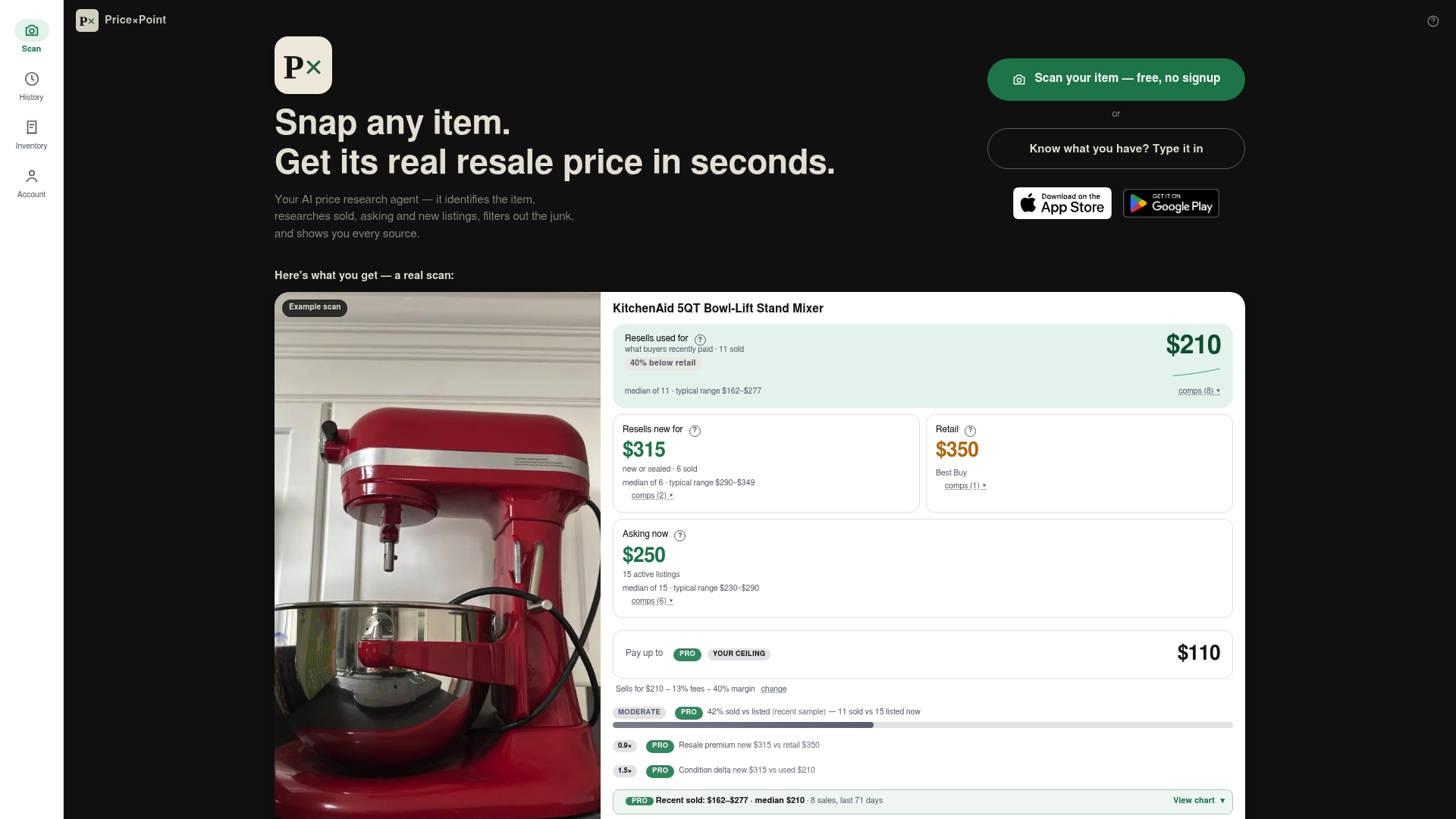
For a single item, that means a price you can trust in seconds instead of ten minutes of manual searching. For resellers moving inventory in batches, the CSV bulk upload prices a whole lot of items at once instead of one at a time, which matters when your evening only has so many hours in it. Whether you are clearing out a closet or running a resale side business, PriceXPoint's Basic, Pro, and Power plans scale from occasional sellers to high-volume ones.
Start by checking what your item is actually worth right now at Pricexpoint, then list with a number backed by real sold data instead of a guess.
Sources
- Onsite Checkout Payments Features Terms and Conditions | Transparency Center
- How to View Sold Items on Facebook Marketplace
FAQ
How should I price items on Facebook Marketplace?
Start by finding several recent sold listings for the same item in similar condition, then set your price slightly above that baseline to leave room for negotiation. Adjust for condition, missing accessories, and whether you are shipping or offering local pickup, since shipped sales include the delivery cost in the fee calculation.
How much does Facebook Marketplace charge to sell stuff?
Local pickup sales typically carry no Meta selling fee at all. Shipped sales through Facebook Checkout are charged on the full transaction, sale price plus shipping plus tax, with the US rate listed at 10% with a minimum fee, and rates vary by country.
How does Facebook Marketplace pricing work?
Meta calculates its selling fee on the entire transaction amount rather than just the listed item price, meaning shipping charges and applicable taxes are included in the base the fee is applied to. That fee is deducted automatically by the payment provider before your payout, and it generally is not refunded even if the item is later returned.
How do I know how much to sell something for on Facebook Marketplace?
Check the sold-listing view on Marketplace and filter by condition, price, and delivery option to find genuinely comparable sales rather than relying on what other sellers are currently asking. Tools like PriceXPoint can pull that sold-price data automatically across multiple markets if you want a faster answer than manual searching.
Is Facebook Marketplace free to use?
Browsing and listing items on Facebook Marketplace is free, and local pickup sales generally involve no Meta fee. A selling fee only applies when a buyer pays through Facebook Checkout for a shipped item, calculated on the full transaction total under Meta's published terms.