
Sell-through rate is the percentage of your listed items that actually sold in a given time window, and it is the fastest way to tell if an item is worth your shelf space. Before you source, price, or relist anything, check your rate across 30, 60, and 90 day windows in Seller Hub's Product Research and compare it against your category's typical pace. Tools like price lookup apps can speed up that comparison when you need verified sold prices fast.
TL;DR:
- A sell-through rate above 20% over 30 days generally indicates healthy demand, but small or seasonal sample sizes can distort the percentage.
- Always compare the sell-through percentage to the total sold volume and category norms instead of relying on a single snapshot.
- Use consistent time windows for analysis and prioritize larger, stable samples to trust your sell-through data.
- Filtering sold listings to exact models, conditions, and variants improves accuracy and prevents inflated rates.
- Tools like Seller Hub and PriceXPoint can accelerate market research and help interpret sell-through signals for better sourcing and pricing decisions.
Table of Contents
- 1. What sell through rate actually tells resellers
- 2. How to calculate sell through rate step by step
- 3. Where to find sell through data in Seller Hub
- 4. Good, borderline, and poor sell through benchmarks
- 5. Turning sell through rate into sourcing and pricing decisions
- 6. Why verified sold data reduces sell through errors
- 7. When to trust a sell through number and when to dig deeper
- 8. PriceXPoint for fast sold-price checks and batch research
- 9. Resources for checking your own sell through numbers
- FAQ
- Sources
1. What sell through rate actually tells resellers
Sell-through rate measures how fast inventory moves. The formula sits on two numbers: how many units sold (the numerator) and how many were listed or active during that same window (the denominator). A high rate means demand is outpacing supply at your price point. A low one means you are sitting on dead stock or pricing it wrong.
The metric has real limits. A small sample size, a seasonal spike, or a mix of different SKUs under one search term can all distort the percentage. Treat sell-through as a signal, not a verdict, especially on thin data.
- It works best as a comparison tool across similar items in the same category.
- It works worst as a one-time snapshot on a brand-new or low-volume listing.
- It should always be read alongside sold-volume counts, not instead of them.
2. How to calculate sell through rate step by step
The formula is simple: divide sold listings by active listings, then multiply by 100. Pick a time window first, because sell-through means nothing without one.
- Choose a window: 30 days for fast-moving items, 60 or 90 days for slower categories.
- Count every unit sold in that window for the same item or near-identical comps.
- Count every active listing (yours and competitors') for that same search during the window.
- Divide sold by active, multiply by 100, and record the percentage.
40 sold ÷ 200 active × 100 = 20% sell-through. That rate suggests moderate demand, borderline for a sourcing decision depending on your margin and the category norm.
To plan restocking cadence, convert that percentage into a daily rate. A common technique among sellers is dividing the window's sold count by the number of days, then multiplying by 30 to estimate a monthly figure. Forty sold over 60 days is roughly 0.67 units a day, or about 20 units a month, a number you can plan reorders around.
Keep your window consistent every time you check. Comparing a 30-day rate against a 90-day rate for the same item will always produce misleading swings.

3. Where to find sell through data in Seller Hub
eBay's Product Research tool, also known as Terapeak, reports sell-through rate for searches and product views, and it is the closest thing to an eBay-native source for this number. It calculates the rate from items sold within a configurable window, commonly capped at 90 days.
- Open Seller Hub and navigate to Research, then search your item or category keyword.
- Filter by condition, price range, and listing format to match what you plan to sell.
- Note the sold count behind the percentage. A high rate built on five sales is not the same as one built on five hundred.
- Remember this is market-level research, not a guarantee your specific listing will sell at that pace.
4. Good, borderline, and poor sell through benchmarks
There is no single official cutoff for a good sell-through rate, but practical heuristics help you set thresholds. Fast-moving categories like trending sneakers or seasonal electronics often clear well above average inside a 30-day window, while slower categories such as bulky home goods or niche collectibles can still be profitable at a lower rate if margins hold up.
- A rate built on a handful of sales is noise, not a benchmark, regardless of how high or low it looks.
- Consistent sell-through across multiple 30-day windows is more trustworthy than one strong month.
- Combine the rate with absolute sold-volume before deciding an item is a winner or a dud.
Sellers and reseller forums frequently reference a version of the "5000 rule": the idea that you need a meaningful sold sample, sometimes discussed in the thousands for broad categories, before a percentage becomes statistically dependable. The exact number varies by category and community, but the underlying caveat holds everywhere: small sold-counts produce unreliable percentages, so weight your confidence to your sample size.
Pro Tip: Require a minimum sold-count before trusting a sell-through percentage, not just a high-looking ratio.
5. Turning sell through rate into sourcing and pricing decisions
Sell-through rate only earns its keep when it changes what you buy, how you price, and when you clear stock.
- Before sourcing, check sell-through alongside sold-volume and eBay fees. A 25% rate on an item with thick margins beats a 40% rate on something that barely clears its listing and shipping costs.
- When sell-through is low, adjust format before you panic-sell. Switch a stale fixed-price listing to an auction to test real demand, bundle slow items with faster sellers, or drop price in small increments and re-check the rate after a full window.
- Set a relisting cadence tied to your window choice. If you check 30-day rates, review and relist on a 30-day schedule rather than letting listings drift.
- Clear inventory that stays below your threshold across two or three consecutive windows. Dead stock ties up storage and cash better spent on faster-moving items.
- Plan reorder points using the daily rate you calculated earlier, so you restock before you run out rather than after demand has already cooled.
Pro Tip: Review sell-through by category, not just by item, because category-wide trends often predict where a single listing is heading.
6. Why verified sold data reduces sell through errors
Sell-through rate is only as good as the sold data behind it, and asking-price listings are not the same as completed sales. An item showing one hundred active listings and ten unrelated sold comps for a different model variant will produce a sell-through number that means nothing.
eBay's Product Research reports sell-through from sold listings within its window, which makes it the right starting point. When you need to check dozens of items quickly, a dedicated lookup tool that filters out mismatched or unrelated sold listings saves time and catches errors a manual search can miss.
- Asking prices inflate denominators and distort the true rate if treated as sales.
- Filtering sold comps to the exact model, size, or condition tightens accuracy before you run the math.
- A quick example: a search showing a 60% sell-through drops closer to 20% once unrelated bundle listings and wrong color variants are filtered out of the sold count.
7. When to trust a sell through number and when to dig deeper
Trust sell-through when the sample is large and the category behaves consistently month to month. Dig deeper when the sample is thin, the season is unusual, or the margin after fees barely covers your time. Build a simple habit: check rates weekly for active sourcing, monthly for inventory you already hold, and never act on a single week's spike.
— PricexPoint
8. PriceXPoint for fast sold-price checks and batch research
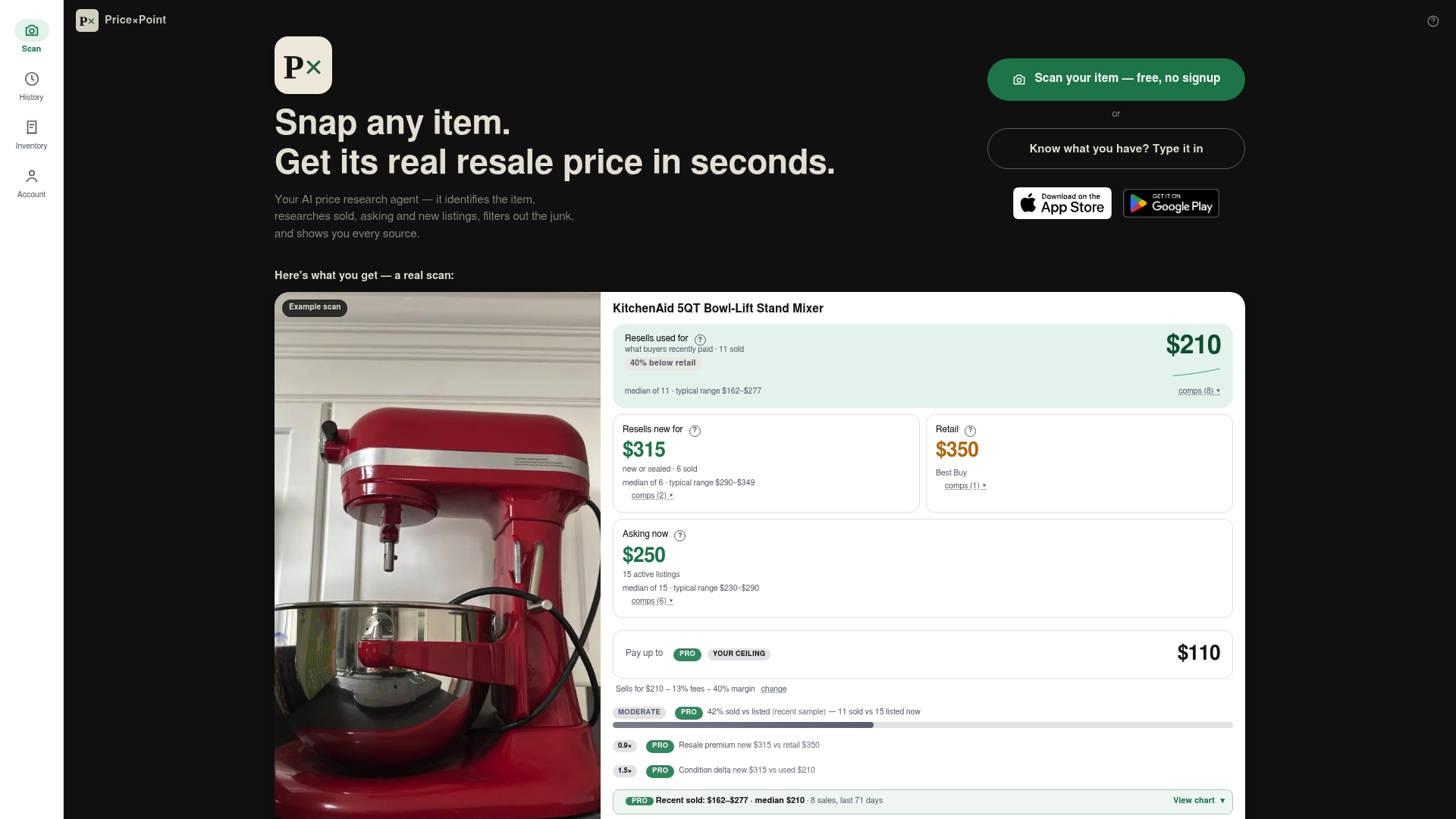
Checking sell-through by hand across dozens of potential items eats time you could spend sourcing or listing. Some apps handle that research by photo or item name, pulling real sold, asking, and new listing data across multiple marketplaces and filtering out mismatched results that skew your numbers.
- Snap a photo or type an item name to get sold prices.
- Run bulk checks with CSV upload or multi-item photos when auditing a sourcing haul.
- See asking, sold, and new prices side by side to judge sell-through signals against market activity.
For readers running regular sourcing audits, broader marketplace analytics tools can round out the picture alongside item-level checks. When you are ready to price-check a batch of items, visit the PriceXPoint pricing page to compare the Basic, Pro, and Power plans, or try a single lookup on the worth page first.
9. Resources for checking your own sell through numbers
- eBay Product Research (Terapeak) for official sell-through figures by search and category.
- eBay Community forums for seller-reported sell-through examples and sample-size discussion.
- PriceXPoint's worth pages for verified sold prices on specific items like the Adidas Ultraboost 22 or the Vitamix 5200 blender.
FAQ
What is a good sell-through rate for eBay?
There is no single official benchmark, since what counts as good depends heavily on category and season. Fast-moving goods tend to clear faster than bulky or niche items, so compare your rate against similar listings in the same category rather than a fixed universal number.
How do I find my eBay sell-through rate?
Open Seller Hub and use Product Research (Terapeak), which reports sell-through for searches based on items sold within a configurable window, commonly up to 90 days. Filter by condition and format to match your listing before reading the percentage.
How do I calculate sell-through rate?
Divide the number of units sold in a chosen time window by the number of active listings in that same window, then multiply by 100.
What is the 5000 rule on eBay?
The "5000 rule" refers to a seller heuristic that a sell-through percentage needs a meaningful sold sample before it becomes statistically dependable, since small sold-counts produce noisy, misleading rates. The exact threshold discussed varies by category and seller community, so treat it as a caution about sample size rather than a fixed eBay policy.
Sources
- Product Research (Terapeak) reference — eBay Export resources
- Sell Through Rate Calculation Question — eBay Community